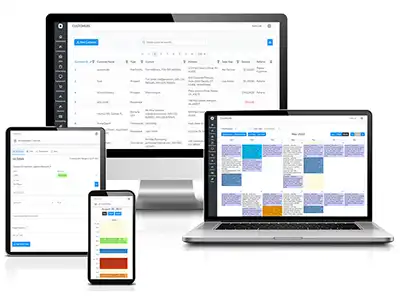
Dispatch software for service companies that run on same-day response.
Dispatch decides whether the rest of the day works. Bella FSM gives service companies one board for every open call, every crew, and every truck, so whoever answers the phone can assign a job, see it accepted, and watch it close without chasing anyone for an update.
Drag-and-Drop BoardReassign a job in seconds
Real-Time AlertsText and email, office to field
Dispatch AppEvery job on the tech's phone
Card Payments On SiteIncluded in the base plan
What is dispatch software?
Dispatch software is a cloud system a service company uses to assign jobs to technicians, track those jobs in real time, and keep the office and the field looking at the same schedule. It replaces the whiteboard, the phone tree, and the spreadsheet most shops start with. The dispatcher sees every open call, every crew's workload, and every job's status on one screen. The technician sees the same job on a phone, with the customer's full service history and the site notes already attached to it.
Owner-dispatchers running two or three trucks
For a small shop it means the person answering the phone can book the call, assign it, and know it was finished without a single follow-up text.
Full-time dispatchers coordinating multiple crews
For a larger operation it means one board covering every crew, region, and skill certification, with a reassignment taking seconds instead of three phone calls.
Bella FSM is dispatch software built for exactly that range. Two trucks up to a multi-crew regional operation. 14-day free trial, no credit card, no term commitment.
One unnecessary hour a day lost to poor routing adds up to 260 hours a year, worth about $39,000 at a $150 billable rate. Source: 2026 State of Small Field Service Businesses
One dispatch board from the first call to the last invoice.
Most shops do not lose money on the work itself. They lose it in the gaps: the callback nobody assigned, the tech who drove across town for a job another tech was already on, the finished job that never got invoiced. Bella FSM closes those gaps by keeping the whole day in one place.
Drag-and-Drop Dispatch in Day, Week, or Month View
Day, week, and month views of every crew. Drag a job to a different tech or a different hour and the board, the technician, and the customer notification all update together.
Dispatch by Skill and Service Region
Assign service regions and worker skills so the right person takes the call. Fewer cross-town drives, higher first time fix rates, and less time lost to a second visit.
Live Dispatch Status and Color Codes
Every job carries a status and a color, so the whole office can read the board at a glance. Unassigned, en route, on site, and complete are all visible without asking anyone.
Dispatch Alerts and Appointment Reminders
Text and email alerts fire the moment a job is assigned, moved, or completed. Customers get appointment reminders automatically, so fewer visits are wasted on an empty house.
Mapping, Recurring, and Maintenance Dispatch
Plot the day on a map to cut travel time and fuel. Set recurring appointments and maintenance visits once and Bella FSM keeps generating them on the cycle you chose.
Customer Records on the Dispatch Board
Past visits, job notes, and open balances travel with the job, so the tech arrives knowing what happened last time instead of asking the customer to repeat it.
Dispatch and scheduling software on one drag-and-drop board
The morning board is where a service day holds together or comes apart. Bella FSM works as dispatch scheduling software on one screen, with every open job, every assigned crew, and every gap in the day on a single drag-and-drop calendar. Move a job and the technician knows before you have finished letting go of the mouse.
Assign dispatch by service region, skill, and crew
- Assign service regions and worker skills so travel time drops
- One job or several assigned to a technician or a full crew
- Slot an emergency call between booked work without rebuilding the day
Color-coded dispatch status the whole office can read
- Day, week, and month calendar views with color-coded job status
- Filter the board by crew, service region, or job status
Recurring and maintenance dispatch on a set cycle
- Recurring appointments generated on the cycle you set
- Maintenance contracts that keep producing work orders without a reminder
Access the Dispatch Software from Anywhere at Anytime
A technician who has to call the office to find out what the job is has already lost part of the morning. The Bella FSM dispatch app puts the work order, the address, and the customer history on the phone, and sends status back to the board the moment anything changes.
Dispatch App for iPhone, Android, or any browser
- Native apps on the App Store and Google Play
- Or sign in from any mobile browser: it is web based service dispatch software, so nothing is missing
- Mobile dispatching software that behaves the same on either one
Mobile dispatch software for crews in the field
- Book and assign work from the office or from the truck
- Notification alerts and reminders on new and existing jobs
Service history inside the technician's dispatch app
- Full customer service history available instantly on site
- Time tracking and status updates logged from the job
Dispatch management software that tracks every job to payment
A dispatched job is not a finished job. Bella FSM tracks each one from the first call through the estimate, the work order, the invoice, and the payment, so nothing sits in a status nobody is watching. It pairs with the job scheduling software side of the platform, and when someone asks where a job stands, the dashboard already knows.
Dispatch status from estimate to payment
- Follow estimates, work orders, invoices, and payments in one thread
- Customized work order forms and maintenance contracts
- Time tracking per job, per technician, per crew
Dispatch dashboards and schedule summary reports
- An up to the minute dashboard view of the business
- Schedule summary reports and crew utilization at a glance
The dispatch workflow, from first call to closed job
This is what happens between the phone ringing and the money landing. Each step hands the next one everything it needs, so nobody re-keys the same address twice.
The call reaches dispatch
The customer record opens with past visits, equipment, and balances already attached. No hunting through a filing cabinet.
Dispatch the right tech
Filter the board by skill and service region, drop the job on a crew, and the assignment is done.
The dispatch alert fires
Text and email alerts land immediately. The job appears in the dispatch app with the address, the job notes, and the customer history.
Status flows back to dispatch
En route, on site, complete. The office sees each change as it happens and the customer gets notified.
Invoice and get paid
The completed work order becomes an invoice, syncs to QuickBooks, and takes a card payment through Stripe.
See how each trade runs dispatch in Bella FSM
A plumbing emergency and a quarterly maintenance visit do not get dispatched the same way. Bella FSM works as service dispatching software across dozens of trades and adapts to how each one books, assigns, and closes work. Pick yours to see what the board looks like for that kind of day.
Common questions about dispatch software.
How does dispatch software work?
A call comes in and becomes a job record. The dispatcher assigns it on a shared board, filtered by technician skill and service region. The assigned tech gets a text or email alert and opens the job on a phone. Status changes flow back to the office live, and the completed work order becomes an invoice.
What is the difference between dispatch software and scheduling software?
Scheduling decides when a job happens. Dispatching decides who goes and makes sure they know. In practice most service companies need both, which is why Bella FSM works as scheduling and dispatch software in one system: the calendar holds the plan and the dispatch board handles the reassignments the plan never survives. Buyers searching for scheduling and dispatching software are usually looking for exactly that combination.
Is there a dispatch software app technicians can use in the field?
Yes, and there are two of them. Bella FSM ships native apps on the App Store and Google Play, and the full platform also runs in any mobile browser, so crews pick whichever suits them. Technicians see assigned jobs, customer service history, and time tracking, and update status from site while the office watches the board change.
Does your service dispatch software work with QuickBooks?
Yes. Completed jobs become invoices in Bella FSM and sync to QuickBooks Online or QuickBooks Desktop, so your bookkeeper is not re-keying anything. Customers, items, and payments stay aligned across both systems. The sync is a ten dollar a month add-on; card processing is already in the base plan. See the QuickBooks integration for setup details.
Is Bella FSM a good fit as small business dispatch software?
It is built for it. Plenty of customers run two or three trucks with the owner doing the dispatching between jobs. Pricing starts at thirty five dollars a month for the first user and ten for each one after, so a small crew stays cheap and there is no term commitment. Dispatch software for small business should not need an implementation team.
How much does dispatch software cost?
Bella FSM starts at $35 a month for the first user, with each additional user at $10 a month. Scheduling, dispatch, work orders, alerts, invoicing, and card processing are in that base plan. Options like QuickBooks sync, file attachments, and equipment tracking are $10 a month each. Full detail sits on the pricing page.
Put every call, crew, and truck on one dispatch board.
Free 14-day trial. No credit card required. Cancel anytime. Support from people who have talked a dispatcher through a bad Monday before.
- Drag-and-drop board with day, week, and month views
- Skill and service region assignment
- Text and email alerts to crews and customers
- Dispatch app on any phone or tablet
- Card payments taken on site
- Scheduling, dispatch, alerts, and invoicing in the base plan