
Grow Your Business
Mobile Field Service App
Mobile field service app for small service businesses
Your technicians get the day's jobs, customer history, photos, signatures and payments on iPhone or Android, and the app keeps working where the signal drops. Bella FSM is $35 a month for one user plus $10 for each added user.
14-day free trial, no credit card
iPhone, Android and any mobile browser
Job updated
3 photos attached · signed
No signal in the basement
Saved offline · syncs later
iPhone & AndroidNative app for technicians
Works OfflineSyncs when the signal returns
Get Paid On SiteSignatures, invoices and payments
Any BrowserFull platform, no download needed
In plain English
What is a mobile field service app?
A mobile field service app is the phone side of your field service software. It shows each technician their jobs for the day, the customer's history and the parts they need, and it sends everything they do on site, from photos to signatures to payments, straight back to the office. A good field service mobile app, which some vendors call an FSM app or mobile field management software, replaces the printed job sheet, the call to the office and the end-of-day paperwork.
For the tech in the driveway
The job, the address, the last visit's notes and the parts on the truck, all on one screen. When the work is done, the tech takes the signature and the payment before leaving.
For the office running the crew
Mobile workforce management software lets the owner or dispatcher see every job's status as it changes and move work from a phone, without waiting for techs to call in.
What to look for in a field service app
- Offline mode, so jobs still open and photos still save where there is no signal
- On-site payments, so the tech takes the signature and the payment before leaving
- Phone-browser access to the full platform, so the office isn't tied to a desk
One app for one tech or a whole crew. $35 a month for the first user, $10 a month for each additional user, with a 14-day free trial.
In the field
What Your Technicians Can Do with the Mobile App
Your field technicians shouldn't have to call the office to get job details, check a customer's service history, or find out if a part is in stock. Bella FSM's mobile field service app puts everything they need in their pocket, on both iPhone and Android.
The day's schedule with history
Each tech sees their jobs for the day with the customer address, job details and past service history, laid out by the service scheduling software in the office.
Job status in real time
Techs update each job's status as they work, so the office knows exactly where every job stands without a phone call.
Photos on the work order
Capture photos before, during and after the job and attach them straight to the work order, as proof of the problem and of the finished work.
Parts checked before leaving
Check parts inventory before heading out, so the tech arrives with the right equipment instead of making a second trip.
Signed, invoiced and paid on site
Collect the customer's signature, send the invoice with the built-in field service invoicing software and take payment before the van leaves.
Time tracking and alerts
Log time on each job for accurate labor costing, and get text and email notifications the moment a new job is assigned or the schedule changes.
The app is on Google Play and the Apple App Store. No special hardware is needed: any smartphone or tablet works.

Offline Mode
Offline Access & Real-Time Sync
Technicians don't always have reliable cell service: basements, rural areas, and large commercial buildings are dead zones. Bella FSM's mobile app works offline, so your team can still access job details, update statuses, and capture photos even without an internet connection.
When connectivity returns, everything syncs automatically. No data is lost, no double entries, no manual uploads. The office sees updates as soon as the tech gets back in range.
- Open job details and customer history offline
- Update job status and capture photos with no signal
- Automatic sync the moment the phone reconnects
For the office
Mobile Workforce Management for Service Teams
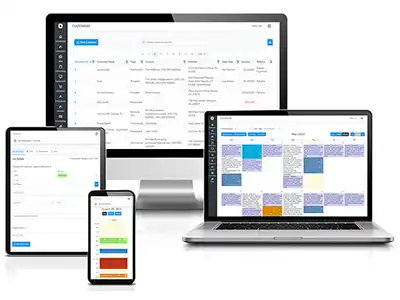
Owners and dispatchers can run the crew from a phone too: reassign a technician during a meeting, check the live dashboard from a tablet at home, or pull up a full customer report from the truck.
- Real-time dashboard showing all technician locations and job statuses
- Drag-and-drop calendar for scheduling from any device and screen size
- Full field service CRM, invoicing, and inventory, not a stripped-down mobile version
- Appointment reminders and follow-ups sent to customers
- Maintenance contract tracking with automated recurring job creation
Two ways to work
Mobile Workforce Management: App + Responsive Web Platform
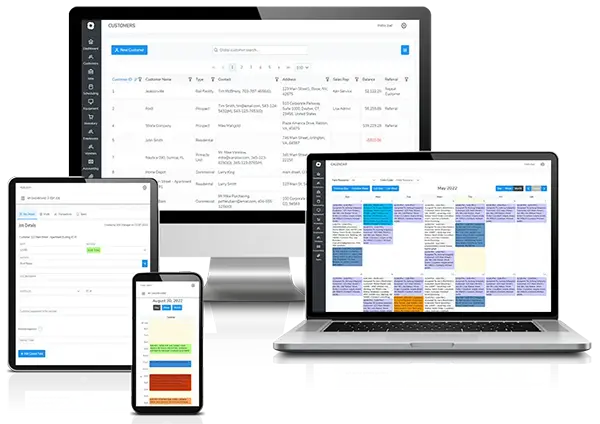
Most field service competitors give you one way to work on the go: their mobile app. Bella FSM gives your team two, and both are fully functional. Use the mobile workforce management app in the field, the browser in the office, or both. The data stays synced across every device in real time.
Option 1: Native mobile app (iPhone & Android)
Download the Bella FSM app from the App Store or Google Play for a streamlined experience built for technicians in the field: quick job updates, photo capture, offline access, and push notifications.
Option 2: Full web platform in any mobile browser
Log in from Chrome, Safari or Firefox and you get every desktop feature: scheduling, reporting, invoicing, CRM, inventory, work orders and admin settings. The screen adjusts to a phone, a tablet or a laptop, with no pinching or zooming.
Side by Side
How Bella FSM's mobile app compares to competitors
Jobber, Housecall Pro and ServiceTitan all have mobile apps. The differences show up in offline use, checking inventory from the field, the full platform in a phone browser, and the price per added user.
| Mobile App Feature | Bella FSM | Jobber | Housecall Pro | ServiceTitan |
|---|---|---|---|---|
| Native iPhone & Android App | ✓ | ✓ | ✓ | ✓ |
| Offline Access | ✓ | Limited | Limited | ✓ |
| Photo Capture & Attachments | ✓ | ✓ | ✓ | ✓ |
| Real-Time Job Status Updates | ✓ | ✓ | ✓ | ✓ |
| Customer History on Mobile | ✓ | ✓ | ✓ | ✓ |
| Inventory Check from Field | ✓ | ✗ | ✗ | Add-on |
| On-Site Payment Collection | ✓ | ✓ | ✓ | ✓ |
| Time Tracking per Job | ✓ | ✓ | Limited | ✓ |
| Full Platform via Mobile Browser | ✓ | Limited | Limited | Limited |
| Responsive UI (Any Screen Size) | ✓ | App only | App only | App only |
| No App Download Required | Web option | ✗ | ✗ | ✗ |
| Starting Price | $35/mo + $10/user | $39/mo + $29/user | $49/mo + per user | Custom ($$$$) |
$35/mo for the first user, $10/mo for each additional user. Add-ons $10/mo each. Competitor details are from our earlier comparison. Plans change, so check each vendor's site.
Built for Your Trade
Mobile App for Every Field Service Industry
The same app your HVAC technician uses to check equipment history and log refrigerant levels is the one your plumber uses to photograph a damaged pipe and capture a customer signature. See how service businesses in your industry use it.
FAQs
Common questions about the mobile field service app
Does Bella FSM have a mobile app for field technicians?
Yes. Bella FSM has a native mobile app on both iPhone (App Store) and Android (Google Play). Technicians can view their schedule, update job statuses, capture photos, check inventory, collect signatures, and process payments, all from their phone or tablet.
Does the mobile field service app work offline?
Yes. Bella FSM's mobile app works without an internet connection. Technicians can access job details, update statuses, and capture photos offline. When connectivity returns, everything syncs automatically with the office.
Can technicians take photos and attach them to jobs?
Yes. Technicians can capture photos directly from the app and attach them to any work order, before, during, and after the job. This is useful for documenting damage, verifying completed work, and providing proof of service to customers.
Can customers pay on site through the mobile app?
Yes. The technician collects the customer's signature, sends the invoice and takes the payment from the app before leaving the job.
What's the difference between the mobile app and the web-based software?
The native mobile app is built for technicians in the field: quick job updates, photo capture, and offline access. The web-based platform has every feature of the software and adjusts to any screen, phone, tablet, or laptop. Both sync in real time, so you can use the app, a mobile browser, or both.
Ready when you are
Put the whole job in every tech's pocket
Give your crew field service mobile software that works in basements and on rooftops, and lets them finish the paperwork and get paid before they leave. Free 14-day trial, no credit card, cancel anytime.
What your techs get on day one
- Native iPhone and Android app
- Offline access with automatic sync
- Photos and signatures on the work order
- Invoices and payments on site
- Parts inventory check from the field
- The full platform in any mobile browser