
Grow Your Business
Service Scheduling Software
Service scheduling software for small business
Keep every job, technician and truck on time. Bella FSM helps small and midsized service businesses schedule jobs, assign technicians, manage recurring appointments, and update crews in real time, from $35 a month for one user plus $10 per added user. The same system connects scheduling with work orders, customer records, invoicing, and payments.
14-day free trial, no credit card
Mobile app for iOS & Android
Today's schedule
18 jobs · 0 double-booked
Reminder sent
Customer confirmed · 9:00 AM
Drag-and-Drop CalendarReschedule any job in seconds
Real-Time AlertsTechs notified when jobs change
Service Scheduling AppiOS & Android for technicians
Online BookingCustomers book appointments 24/7
In plain English
What is service scheduling software?
Service scheduling software is a cloud-based calendar system that service businesses use to book jobs, assign technicians, and keep the office and the field working from the same schedule. It replaces the paper calendar, the whiteboard, and the group text with one shared view of every appointment and open time slot. Field service scheduling software also connects each booking to the customer record, the work order, and the invoice, so the technician arrives with the job history and the right parts.
Owner-operators and small crews
For a two-truck shop, service appointment scheduling software means no double bookings, reminders that send themselves, and a schedule the owner can change from a phone.
Multi-crew service companies
For a larger team, scheduling software for service technicians means one board across every tech, maintenance visits that book themselves, and a dispatcher who knows who is free before the phone rings.
Built for one technician or several crews. $35 a month for one user plus $10 per added user, with a 14-day free trial and no credit card.
In the 2026 survey, 29% of small business owners reported job openings they could not fill, and a technician losing one unnecessary hour a day gives up about 260 hours a year, so the schedule has to get more out of the crew you already have. 2026 State of Small Field Service Businesses
The day falls apart fast
Why service scheduling breaks down without the right software
The Reality
The moving pieces every morning
- Dozens of jobs spread across multiple technicians
- Emergency calls landing mid-route
- Recurring maintenance visits coming due
- Customers asking for tighter arrival windows
- Crews, trucks, and parts to line up before rollout, with the right parts loaded
Without the Right Tool
Where paper calendars and spreadsheets fail
- Two techs booked against each other, and a blown arrival window
- Job changes buried in a group text
- No-shows because nobody sent a reminder
- Phone tag between the office and the field all day
- Recurring visits that quietly slip through the cracks
With Bella FSM
What changes with one shared calendar
- Drag-and-drop rescheduling in seconds
- Every appointment visible to the office and the field
- Automatic reminders that cut no-shows
- Recurring jobs that generate themselves
- The right tech showing up on time with the parts the job needs
One calendar for the whole operation
Calendar, recurring appointment and online booking features
Service work gets booked, moved and reassigned all day, and service industry scheduling software has to keep up. Everything you need to book, assign, and track appointments sits in one calendar that your office and field teams share in real time.
Office and field stay in sync
When the office moves a job, the new time shows up on the technician's phone. When a tech closes a job in the field, the office sees it without a phone call. Nobody retypes anything, and nobody works from yesterday's version of the schedule.
Book the right tech the first time
See who is free before you promise an arrival window. Each job on the calendar carries the customer's history and the parts it needs, so whoever takes it shows up prepared. That is how job scheduling software for technicians raises first-time fix rates and keeps service level agreements on track.
Crew assignments in a few clicks
Put one tech or a whole crew on a job, and change it when someone calls in sick. Part-time and full-time staff share the same calendar, so you can tell who already has a full day before you add another stop.
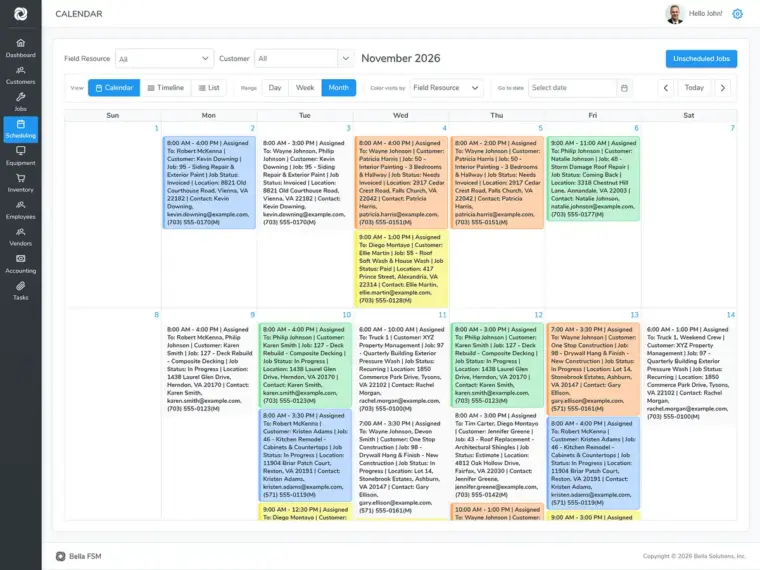
Calendar views and recurring visits
Switch views to plan today's timeline or look weeks ahead. Set up a recurring visit once, with its frequency and technician, and the appointments create themselves. Color codes separate a standing maintenance contract from a one-time call at a glance.
A job scheduling app for the field
Technicians open the day's jobs on iOS or Android with the address, tasks, and customer details attached. Schedule changes reach them by text or email, and customers get appointment reminders without anyone in the office sending them.
Online booking system, day or night
Customers request an appointment online at any hour instead of waiting on hold. The office confirms it on the shared calendar and the reminder goes out by itself. It works as appointment scheduling software for small business teams, with no second tool to pay for.
Side by Side
How Bella FSM compares to other service scheduling solutions
Most of the difference between these tools shows up on the invoice rather than the feature list. Per-user fees climb every time you hire, inventory tracking tends to sit behind a pricier tier, and some tools in this category still lack a true mobile app for technicians. The table covers the points people ask about most.
| Feature | Bella FSM | Jobber | Housecall Pro | ServiceTitan |
|---|---|---|---|---|
| Drag-and-Drop Calendar | ✓ | ✓ | ✓ | ✓ |
| Real-Time Dispatch | ✓ | ✓ | ✓ | ✓ |
| Mobile App for Technicians | ✓ | ✓ | ✓ | ✓ |
| Recurring Appointments | ✓ | ✓ | ✓ | ✓ |
| Color-Coded Scheduling | ✓ | ✓ | Limited | ✓ |
| Built-in Inventory Tracking | ✓ | ✗ | ✗ | Add-on |
| Built-in CRM | ✓ | ✓ | ✓ | ✓ |
| Starting Price | $35/mo + $10/user | $39/mo + $29/user | $59/mo + per user | Custom ($$$$) |
Bella FSM's base price of $35/mo includes one user. Competitor pricing and feature availability as published by each vendor. Plans change, so verify current details on each vendor's site.
What a week looks like
A small crew's week on one schedule
Take a three-tech shop with a mix of maintenance customers and new calls. Here is how the week runs when everyone works from the same calendar instead of a whiteboard and a group text.
Monday: the week is already booked
Recurring maintenance visits are on the calendar before anyone opens the office, each with its customer, address and assigned tech. The owner fills the open slots with new calls instead of rebuilding the week by hand.
Wednesday: a tech calls in sick
Drag the four jobs onto the other two techs' days. Their phones update right away, with no round of phone calls to the crew.
Friday: next week's gaps are visible
Online booking requests that came in overnight are waiting to confirm, and the week view shows which days still have room. The weekend starts with Monday already planned.
Start the 14-day free trial (no credit card), add your techs and recurring customers, and run next week from the calendar.

Mobile Scheduling
Every tech's schedule on their phone
Look weeks or even months ahead to confirm the right techs are available when the work lands. A simple drag and drop calendar is what makes a job scheduling tool worth using, because plans change and you need to change with them in seconds. Good service technician scheduling software puts each tech's route, tasks, and customer details on their phone.
- Multiple calendar views with color coding options
- Recurring appointments set up in a few clicks
- Crew scheduling and mapping
- Text message and email alerts with appointment reminders
- Online booking for customer convenience
After the job is booked
Job scheduling software connected to the rest of the job
A generic calendar stops at the time slot. In service business scheduling software, every job on the schedule is tied to the customer, the parts, the paperwork and the payment, and each of those has its own page if you want the detail.
Work orders
Each booking becomes a work order with photos, files, custom checklists and logged hours. See how jobs flow into work orders.
Job change alerts
When a job changes, the tech gets a text or app alert the moment it happens. Routing and real-time assignment are covered on the dispatch software page.
Customer history
Past visits, equipment notes and invoices sit on every scheduled appointment, so nobody calls the office to ask what happened last time. It all lives in the field service CRM.
Parts on hand
Techs check what is in stock before they leave for the job. Jobber and Housecall Pro don't include inventory tracking.
The field app
Jobs reach each tech's phone the moment they are booked. More on the mobile app for technicians.
Invoice and payment
When the job closes, the invoice goes out from the same record and the customer pays by card. See how you collect payment on site.
Built for Your Trade
Service scheduling program by industry
Every trade books and routes its work differently. Pick yours to see how service company scheduling software handles your job types, your crews and your busy season.
HVAC Scheduling Software
Handyman Scheduling Software
Air Duct Scheduling Software
Plumbing Scheduling Software
Electrician Scheduling Software
Septic Service Scheduling Software
Appliance Repair Scheduling Software
Tree Service Scheduling Software
Gutter Scheduling Software
Window Cleaning Scheduling Software
Carpet Cleaning Scheduling Software
FAQs
Common questions about service scheduling software.
What is the best scheduling software for field service businesses?
Good field service scheduling software gives you a calendar you can drag jobs around on, real-time technician dispatch, mobile app access, and automated appointment reminders. Bella FSM has all four, plus built-in invoicing, inventory tracking and payment processing at no extra cost. Jobber and Housecall Pro don't include built-in inventory tracking.
How does scheduling software improve first-time fix rates?
A technician who can see the job history, the customer notes, and the parts inventory before arriving shows up prepared. Bella FSM's scheduling ties into CRM records and inventory tracking, so your team knows what equipment to bring and what happened on the last visit. Fewer surprises on site means fewer repeat trips.
Can I schedule recurring maintenance jobs automatically?
Yes. Bella FSM supports recurring appointments with color-coded options, so a standing maintenance contract looks different on the calendar from a one-time service call. Set the frequency, assign a technician, and the jobs create themselves, with your team and the customer notified each time a visit lands on the schedule.
What is the difference between job scheduling software and dispatch software?
Job scheduling software is about booking, assigning, and organizing service appointments on a calendar. Dispatch software is about real-time routing and getting a technician moving toward a job. Bella FSM does both: schedule on the shared calendar, then dispatch with automated notifications and mobile app updates. Our dispatch software page goes deeper on routing and real-time assignment.
Is my scheduling data secure in the cloud?
Data security is a priority for most providers in this category, and the standard protections are encryption, secure servers, and regular backups of your real-time data. You also control user access levels, so only the people who should see sensitive customer or financial information can open it.
Is Bella FSM a good fit for a small service business?
Yes. It is built as job scheduling software for small business teams: clients book online, the office confirms on the shared calendar, and automated reminders cut no-shows. Every tech gets the service scheduling app on their phone, with routes, job details and customer history. Pricing starts at $35 a month for one user and each added user is $10 a month, so the field scheduling software grows with your crew. The 14-day trial shows whether it fits.
Ready when you are
Grow your service business with Bella FSM
Ready to retire the paper calendar and the spreadsheet? Put your whole week into one service scheduling program your office and crews share. Free 14-day trial, no credit card, cancel anytime.
What you get on day one
- Drag-and-drop calendar with multiple views
- Unlimited work orders
- Technician mobile app with real-time alerts
- Online booking for your customers
- Recurring jobs and maintenance contracts
- Invoicing and Stripe payment processing