
Grow Your Business
Property & Building Maintenance Software That Works for You
Property maintenance companies reduce costs on average by 25% when using Bella FSM.
START FREE TRIAL

If you run a maintenance business - whether for single-family homes, apartment buildings, student housing, or commercial properties - you know how chaotic things can get. Tracking work orders, dispatching crews, managing invoicing, and keeping customer records can eat up hours of your day.
That’s where property maintenance software, also known as building maintenance management software, can make a real difference. We’ve built a system designed to help you run your business more smoothly so you work on servicing buildings, not juggling spreadsheets.
Why Use Property Maintenance Software?
Smart Maintenance Scheduling & Dispatching
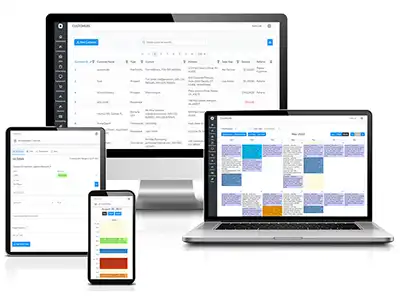
Our intuitive property maintenance system makes it easy to book appointments, assign jobs to the right techs, and avoid double-bookings with a drag-and-drop calendar.
On-Site Quotes & Invoicing
Generate estimates, send invoices, and collect payments from anywhere with our mobile app, which is fully integrated with QuickBooks.
Detailed Digital Reports
Quickly create and send inspection reports with photos, service notes, and repair recommendations. View open, in-progress, and completed jobs on a live dashboard
Building Maintenance CRM Tools
Centralize customer data, service history, and communications for personalized service and better retention and increased customer satisfaction.
Mobile Access from Anywhere
Maintenance technicians can access job details, capture digital signatures, and update statuses in real time - right from the field.
Job Costing
Monitor job cost at every stage. Identify areas for cost reduction, and make informed decisions about pricing.
What This Building Maintenance Software Offers

Our building maintenance management software is built for real-world companies. Key features include:
- Service scheduling & dispatching with a drag-and-drop calendar
- Work order management (create, assign, track, close)
- Customer and property database (CRM + property history)
- On-site quotes, invoicing, and payment collection
- Mobile app access - field techs stay connected with real-time updates
- Inventory and parts management - track what’s used on each job
- Cloud-based access - works from anywhere, any time
- Secure data storage and backups - no more lost paperwork
It’s designed to handle a variety of properties: single-family homes, multi-unit housing, commercial buildings, and more.
All-in-One Property Management Software for Maintenance
This complete solution covers every aspect of your work:
- Real-time scheduling & dispatching
- Inventory & parts tracking
- Asset management
- Work requests management
- Customer communication
- Inspection reporting
- Automated invoicing & payment collection
- Technician performance tracking
Whether you’re a solo or managing a full crew, our software scales with your business.
Get Started with the Best Building Maintenance Management Software
Modernize your business from faster scheduling to mobile invoicing and smarter reporting. This is the all-in-one platform built for professionals.
What Our Customers Say
“Switching to this building maintenance software saved us hours every week. Scheduling used to be a nightmare — now it’s seamless and organized.”
Alex P..
Building Care Services
“Our techs love the mobile app. They show up, see the job, get the details, invoice onsite — no back-and-forth with the office. It’s cut down admin time by at least 50%.”
Maria S.
Urban Maintenance & Repair
“Before, we had separate tools for scheduling, invoicing, customer info, and parts. This building maintenance software brings it all together. Makes managing multiple properties so much easier.”
Bryan T.
Reliable Facilities Management
This article highlights the benefits of adopting building maintenance management software. It details how this technology optimizes operations, enhances customer service, and increases overall productivity. Key features include scheduling and dispatching, parts and inventory management, CRM, invoicing and payment processing.
The software is designed for mobile access on all devices, allowing technicians to access maintenance request histories, update job statuses, and receive payments directly from the field. By leveraging technology, owners can streamline processes, reduce operational costs, improve communication, and ultimately drive business growth and profitability.
Getting Started & What to Expect
- Sign up and input your existing properties and client database.
- Add your team and set up roles (office admin, field technician, dispatcher).
- Start scheduling and dispatching work orders instead of juggling paper.
- Have techs complete jobs on their phone - add notes, photos, collect digital signatures.
- Generate invoices and collect payments on-site or right after the job.
- Track work history, parts used, and costs - helpful for future jobs or repeat cycles.
Over time, you’ll build a clean, organized, searchable history of every job - reducing mistakes, improving customer satisfaction, and growing your business.