
Grow Your Business
Free Invoice Template
Our free invoice template makes it easy to create professional invoices for any service business. Fill in your business details, add line items for labor, materials, and services, and click "Create PDF" to generate a clean, branded invoice you can email or hand to your customer.
Whether you are a solo operator or running a growing team, a professional invoice builds credibility and helps you get paid on time. If you are looking for field service management software to manage scheduling, dispatching, estimates, and invoicing in one place, start here with a professional invoice template. Use it as many times as you need — it is completely free.
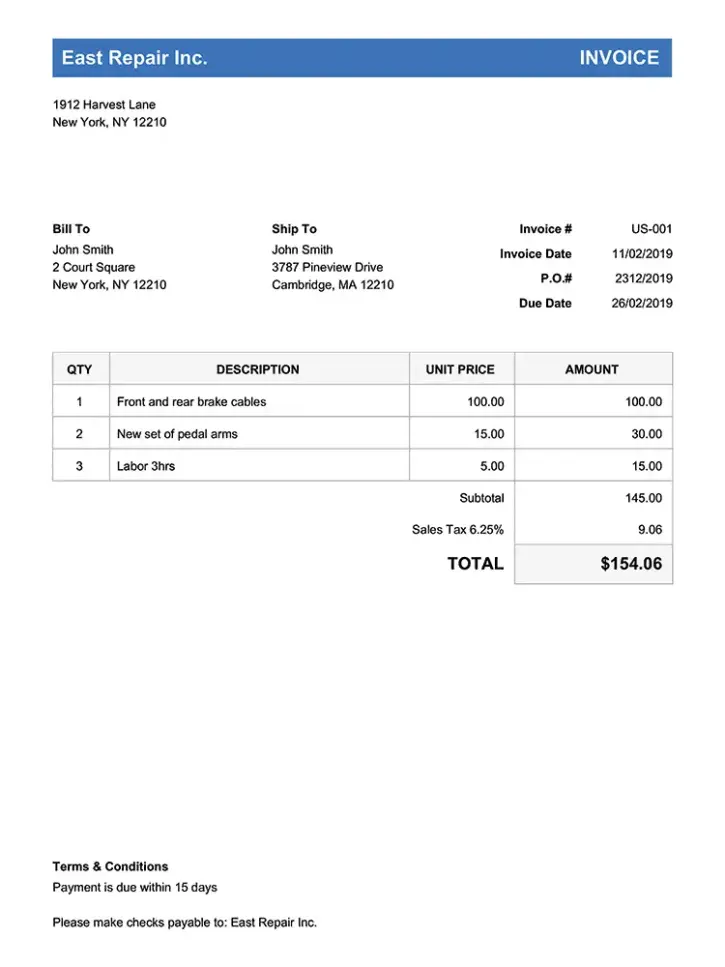
Invoice Template Form
How to Use This Free Invoice Template
A clear, detailed invoice is the fastest way to get paid. Customers are more likely to pay promptly when they understand exactly what they are being charged for. Here is how to get the most from this template:
Step 1 — Enter your business information. Add your company name, address, phone number, email, website, and logo. A branded invoice tells the customer they are working with a legitimate, professional business — not someone who will be hard to reach if something goes wrong.
Step 2 — Add your customer's details. Include the customer's name, address, phone, and email. This ensures the invoice reaches the right person and creates a clear paper trail for both parties.
Step 3 — Fill in the invoice details. Add an invoice number and a due date. Sequential invoice numbers make bookkeeping easier and look professional. Standard payment terms are Net 15 or Net 30 — choose what works for your cash flow.
Step 4 — Add your line items. Break the work into individual services, materials, and charges. Avoid vague line items like "Service — $500." Instead, list each task: "Replaced kitchen faucet — $185, Snaked bathroom drain — $150, Parts and materials — $65, Travel fee — $50." Transparency reduces disputes and speeds up payment.
Step 5 — Include a note to the customer. Thank them for their business, note your payment terms, list accepted payment methods (check, credit card, Venmo, Zelle), and include any warranty or guarantee information.
Step 6 — Click "Create PDF" and send it. The template generates a printable PDF instantly. Email it, text a link, or print a copy for the job site.
Pro tip: If you send more than a few invoices per week, invoicing software lets you convert estimates into invoices with one click, track payments automatically, and send reminders when invoices are overdue.
What to Include on Every Invoice
Missing information is the number-one reason invoices go unpaid. Make sure every invoice includes these elements:
Your business identity. Company name, logo, address, phone, email, and website. If your state requires a license or registration number, include it.
Customer information. Full name, service address (not just billing address), phone, and email. For commercial clients, include the company name and accounts payable contact.
Invoice number. Use a consistent format like INV-0001, INV-0002, etc. This makes tracking and referencing invoices easier for both you and the customer.
Date and payment terms. Include the invoice date and a clear due date. Common terms: Due on receipt, Net 15, Net 30. For larger jobs, consider milestone billing — 50% upfront, 50% on completion.
Itemized line items. List every service, material, and charge separately with quantities and unit prices. Customers who see exactly what they are paying for are less likely to dispute or delay.
Total and tax. Show a subtotal, applicable tax, and the final total. If you offer a discount, show the original amount and the savings.
Payment methods. Tell the customer how to pay: check, credit card, ACH transfer, Venmo, Zelle, or whatever you accept. Include links or account details where appropriate.
Notes and terms. Late payment policy (e.g., 1.5% per month after 30 days), warranty information, and a thank-you message.
Sample Invoices for Service Businesses
Here are three real-world examples showing how to structure invoices for common service jobs.
Sample Invoice #1 — General Home Repair
| Line Item | Qty | Unit Price | Total |
|---|---|---|---|
| Faucet Replacement | 1 | $150.00 | $150.00 |
| Parts | 1 | $89.00 | $89.00 |
| Supply Lines | 1 | $22.00 | $22.00 |
| Garbage Disposal Reset | 1 | $45.00 | $45.00 |
| Travel Fee | 1 | $50.00 | $50.00 |
| Total | $356.00 | ||
Note to customer: Payment due within 15 days. We accept check, credit card, and Venmo. All labor carries a 30-day warranty. Thank you for choosing us!
Sample Invoice #2 — Recurring Cleaning Service
| Line Item | Qty | Unit Price | Total |
|---|---|---|---|
| Biweekly Cleaning | 1 | $165.00 | $165.00 |
| Oven | 1 | $40.00 | $40.00 |
| Fridge | 1 | $35.00 | $35.00 |
| Total | $240.00 | ||
Note to customer: Invoice covers service on 3/15/2026. Next scheduled visit: 3/29/2026. Payment due on receipt. We accept Zelle, Venmo, or check. Questions? Call us at (555) 123-4567.
Sample Invoice #3 — Commercial Maintenance
| Line Item | Qty | Unit Price | Total |
|---|---|---|---|
| HVAC Filters | 4 | $35.00 | $140.00 |
| Duct Inspection | 1 | $175.00 | $175.00 |
| Emergency Thermostat | 1 | $225.00 | $225.00 |
| Parts | 1 | $68.00 | $68.00 |
| Total | $608.00 | ||
Note to customer: Terms: Net 30. Emergency service billed at 1.5x standard rate (evenings/weekends). Monthly maintenance invoiced on the 1st. Please remit to accounts@yourcompany.com or mail a check to the address above.
Tips for Getting Paid Faster
Late payments hurt your cash flow and waste time on follow-ups. Here is how to get paid on time, every time:
Invoice immediately. Send the invoice the same day you complete the work — or before you leave the job site. The longer you wait, the less urgency the customer feels. Field service software lets you generate and send invoices from your phone before you drive away.
Be specific. Vague invoices invite questions and delays. "Plumbing repair — $450" gives the customer nothing to verify. "Replaced hot water shut-off valve, installed new supply line, tested for leaks — $450" closes the loop.
Offer multiple payment methods. The easier you make it to pay, the faster you get paid. Accept credit cards, ACH transfers, Venmo, Zelle, and checks. Many customers will pay immediately if they can tap a link from their phone.
Set clear terms upfront. Discuss payment terms before the work starts — not after. Put terms on your estimates and your invoices. "Due on receipt" or "Net 15" sets expectations.
Automate reminders. A friendly reminder email 3 days before the due date, the day of, and 3 days after dramatically reduces late payments. Field service invoicing software can handle this automatically so you never have to chase payments manually.
Charge late fees. Include a late payment clause in your terms: "Invoices unpaid after 30 days accrue a 1.5% monthly service charge." Even if you rarely enforce it, the clause motivates on-time payment.
Collect deposits on large jobs. For jobs over $500, request 25–50% upfront. This protects your cash flow and confirms the customer is serious.
More Free Invoice Templates
Need an invoice template for a specific trade? We offer free PDF generators for multiple industries:
- Handyman Invoice Template — General repairs and maintenance
- Lawn Care Invoice Template — Mowing, landscaping, and yard work
- Plumbing Invoice Template — Residential and commercial plumbing
- Tree Service Invoice Template — Tree removal, trimming, and stump grinding
Looking for estimate templates instead? Check our free estimate templates.
Frequently Asked Questions
Start Growing Your Business Today!
Do you enjoy using this PDF template tool? How about trying all of the other features, for free!