
Grow Your Business
Work Order Management
Work order management software for field service teams that run on accountability.
A missed update or a lost work order costs you money, and it costs you reputation with the customer it happened to. Bella FSM gives field service teams one place to create jobs, assign technicians, watch progress as it happens, and close out finished work. The paper forms and the phone tag go away with it.
Office & field in sync
E-signature capture
Auto preventive maintenance
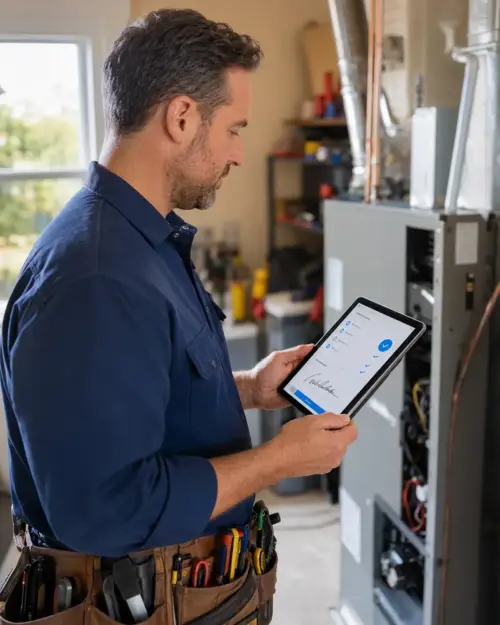
Work orders today
12 closed · 4 in progress
Customer signature
Captured on-site
Real-Time UpdatesOffice & field in sync
E-Signature CaptureSign on-site, email instantly
Auto Preventive MaintenanceRecurring jobs on autopilot
Mobile Field AppAny device, any job site
In plain English
What is work order software?
Work order software is the record system a service business keeps its jobs in. Each work order holds one job: who asked for it, what needs doing, which technician owns it, what was found on site, and what the customer signed for. It replaces the paper ticket, the whiteboard, and the spreadsheet most shops start with. Because that record is shared, the office and the technician read the same thing at the same time.
Small shops running a few work orders a day
For a two-truck operation, it means a job booked this morning in the work order app is the job invoiced tonight, without anyone retyping it in between.
Work order management software for a full crew
For a larger operation, it means one work order system covering every technician, asset, and recurring maintenance cycle, with nothing riding on who remembered what.
Bella FSM is work order software built for that full range, from two trucks up to a multi-crew regional operation. The trial runs 14 days, requires no credit card, and can be canceled anytime.
56% of surveyed small businesses reported being owed money on unpaid invoices, averaging $17,500 per business, and 47% had a portion of their invoices overdue by more than 30 days. Source: 2026 State of Small Field Service Businesses
Built for the trades
Work order management software features built for the trades.
The pieces are wired together. A work order lands on the schedule, the schedule drives dispatch, dispatch puts the job in the technician's hands, and the closed job becomes the invoice. Nobody retypes anything along the way.
Work Order Management
Track work orders and everything attached to them: assignments, labor, expenses, materials, photos. The fields are customizable, so the system bends to the way your shop already works instead of the other way around. Jobs can also be created automatically from emails, forms and spreadsheets
Preventive Maintenance
Recurring jobs handle your repeat work. Set the interval and the system generates the work order on schedule, then sends email and text alerts so you and the customer both know it is coming.
Asset Management
Keep the history on the equipment you service by attaching before and after photos, user manuals, and whatever else matters. Service history reports show you which assets keep coming back, and which ones are about to.
CRM
Built-in CRM tools put service history, contacts, addresses, and assets a click away. When a customer calls, you already know what you did there last time.
Mobile Access from anywhere
Technicians open job details, capture digital signatures, upload photos, and change job status from the field on their own phones. The office sees the update the moment it happens.
Signature Capture
Get the customer's signature on the completed work order right there at the site, then email the signed document before you leave the driveway.

Complete Work Order Lifecycle
Start Free Trial
From work request to resolution, every stage covered.
Plenty of work order tools stop after creation and assignment. Bella FSM's job order management software carries the job the rest of the way: intake, triage, scheduling, dispatch, the work itself, customer sign-off, invoicing, and reporting. Each stage hands off to the next on its own, so jobs do not sit waiting for somebody to move them along.
- Office team creates the work order with details pulled from CRM
- Scheduling engine assigns the right tech by skill, location, availability
- Job pushes to the tech's mobile device with full context
- Field tech logs labor hours, photos, materials, and customer e-signature
- Closed work order auto-generates an invoice synced to your accounting
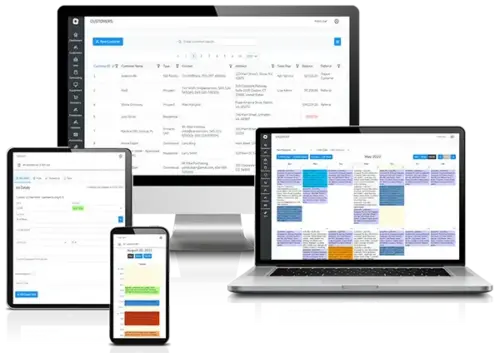
Dispatch & Routing
Explore service scheduling software
Dispatch the right tech to the right job, every time.
Assign or reassign a work order by dragging it. One screen shows you what each technician is carrying today, which certifications they hold, and where they are right now. When an emergency call comes in, you can drop it into the day without wrecking the jobs behind it.
- Drag-and-drop work order assignments in seconds
- Tech workload, skills, and location on one screen
- Emergency jobs slot in without disrupting the day
- Real-time mobile push to the assigned technician

Work Order to Invoice
Explore field service invoicing
Turn completed work orders into paid invoices automatically.
Finished work should not sit in a pile waiting for someone to type it up. Bella FSM turns a closed work order into an itemized invoice with the labor, materials, flat-rate charges, and applicable taxes already on it. You enter the job once, and the money follows the job instead of getting lost behind it.
- Auto-generate itemized invoices from closed work orders
- Include labor, materials, flat-rate charges, and taxes
- Send invoices by email directly from the app
- Accept on-the-spot payment in the field
- Every dollar tracked from job creation through collection
How it works
The 7 steps of field service work order management.
Work order tracking software handles three phases: creation, completion, and recording. Each one has its own steps, and each step is a place where a job either keeps moving or quietly stops.
Phase 1 · Creation
Phase 2 · Completion
Phase 3 · Recording
1
The task is identified
Work falls into two piles: planned and unplanned. Planned is the routine inspection you already knew was coming. Unplanned is the breakdown nobody saw coming.
2
The request is created
Someone puts the details together and submits them to the team. A machine breaks down, the requester writes it up, and it goes in. Planned work triggers itself at the right time.
3
Prioritize
Some requests matter more than others. A burnt-out light bulb can wait. A broken conveyor belt cannot. Everything that hits your desk needs a place in that order.
4
Time to schedule
Online work order software for small business assigns work against a deadline, a planned trigger, or a dedicated block of time. The deadline is what keeps everyone honest about where a job actually stands.
5
Assigned and completed
Now it stops being a description and becomes a job: assign it to a technician, who goes and does it. Some of those are a five-minute equipment check. Some are a complex repair that runs several days.
6
Closed and documented
Once the work is done, the order closes. Maintenance managers may need to sign off on compliance requirements at that point. A strong system holds onto asset history, past solutions, and audit records instead of letting them scatter.
7
Analyzed and modified
Closed work orders are where the useful information lives. Read them and you can see which processes to tighten. When the same problem shows up again, the log tells technicians and managers what was missed and what worked.
Customer Stories
A few of our satisfied customers.
We improved our customer interaction and increased client satisfaction rates, communication between the office and field, and overall productivity. The FSM software was easy to use, helped us save time, and was good for our business.
JB
Jason B.
President · Potomac Valley Construction
Not only is the work order software very user friendly and versatile, by far they provide some of the best customer support I have ever encountered. When I asked myself, what is the best solution, the answer was easy, Bella FSM.
MG
Mariana G.
General Manager · Global Safety & Security
I have reviewed many systems to help me grow my business, most of them had everything you would need but the function and ease of use was not there, Bella FSM made that simple for the user and easy to understand.
DH
Darryl H.
President / CEO / Owner
Customer service was exceptional and responsive. They imported my data and had me up in running in a couple of days! My staff and technicians love it and really helped them get organized and communicate easier. I can already see the improvement to my bottom line. Thank you Bella FSM!
MD
Mike D.
Owner / President
Built for the trades
Why service businesses choose Bella FSM job order management software over generic tools.
General-purpose project tools and spreadsheets were never built for field service. They cannot send a plumber to an emergency call, generate a preventive maintenance work order for an HVAC unit on their own, or take a customer's signature at the job site.
Bella FSM was built for the trades. Enterprise platforms charge premium per-user fees that climb every time you hire. Bella FSM gives small and mid-size service companies the same work order tracking, CRM, scheduling, and invoicing tools without that bill attached.
Frequently Asked
Common questions about work order software.
What is work order software and who needs it?
Work order software is a digital system for creating, assigning, tracking, and closing maintenance and repair jobs in one place. If you send technicians to job sites, whether that is HVAC, plumbing, electrical, property maintenance, or facility management, it replaces the paper work order with something the office and the field can both see.
How does work order management software reduce missed appointments?
Automated scheduling assigns jobs by technician availability and skill set, then pushes the job to that tech's phone. Customers get reminders by email and text. If a job runs long, the dispatcher reassigns it in seconds, and the next customer is not sitting at home wondering.
Can I use Bella FSM for preventive maintenance work orders?
Yes. Set the schedule weekly, monthly, quarterly, or on your own interval, and Bella FSM creates the work order, assigns it, and tells the customer. Each recurring job carries the full asset service history, so the technician knows exactly what was done last time.
Can technicians use the app from any job site?
Technicians can pull up job details, update statuses, capture photos, and collect signatures from the field on any mobile device. The app is built for job-site conditions where the signal is unreliable, so techs have what they need to finish the job.
How does Bella FSM differ from enterprise work order platforms?
Enterprise platforms like ServiceTitan charge premium per-user fees and take a while to onboard. Bella FSM covers the same core ground, which is work order management, scheduling, dispatch, CRM, invoicing, and mobile access, at a price built for small and mid-size service companies. There is a free trial and no long-term contract.
How do I create a work order in Bella FSM?
Click "New Work Order," enter the job details (description, priority, customer, location), attach any relevant assets or documents, assign a technician, and set the deadline. Customer and asset data carries over from previous jobs, so most fields fill themselves. The assigned tech gets an instant mobile notification with everything on it.
Get to the next level
Stop losing money to lost work orders and forgotten follow-ups.
Picking the right service technician work order management system is what stops the slow leak: the work order nobody can find, the invoice still sitting in a drawer, the follow-up that never got made. Free 14-day trial, no credit card required, cancel anytime.
What you get on day one
- Full work order lifecycle from intake to invoice
- Drag-and-drop dispatch with skill-based routing
- Mobile app for any device, any job site
- Recurring preventive maintenance automation
- E-signature capture and instant document email
- Real human support that knows the trades