
Grow Your Business
Zapier Integration
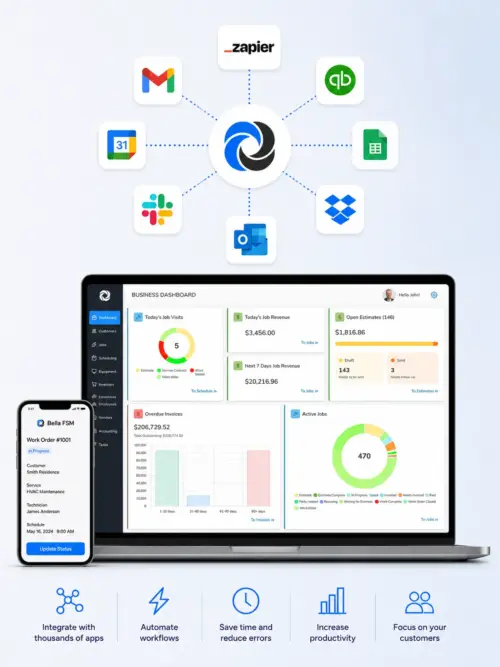
Bella FSM Zapier integration, automate your business across thousands of apps.
Connect Bella FSM to more than 9,000 apps and create jobs automatically from almost any source. For example, an incoming email, a web form submission, a spreadsheet row, a text message, or a work order from a customer's system. Instead of re-typing dispatch details by hand, the information flows in on its own, within seconds of arriving.
One-time API key setup
No coding required
Typo-tolerant customer matching
Zap fired
Job created in seconds
Trigger apps
9,000+ supported
9,000+ AppsConnect almost any source
Create Job ActionJobs appear in seconds
Smart MatchingPlain names, typos tolerated
Secure API KeysRevoke access instantly
Hands-off job creation
What the Bella FSM Zapier integration automates.
Work arrives from everywhere — inboxes, forms, spreadsheets, client portals. With a Zap in place, each of those sources creates the job for you, so dispatch details never wait on manual data entry.
Dispatch Emails Become Jobs
Parse work orders arriving by email from a national account or property manager and create the job automatically — customer, description, and site details mapped straight from the message body.
Website Forms Create Jobs
A service request form on your site — Typeform, Jotform, or your own — creates the job the moment it is submitted. Form answers map directly into job and visit fields.
Spreadsheets Bulk-Load Work
Bulk-load planned visits from a Google Sheets planning tab. Each new row becomes a job with its own first visit, numbered automatically unless you supply your own reference.
Customer Systems via Webhook
Accept work from a client's portal or ticketing system through Zapier's webhooks, no custom development on either side. The moment their system sends it, your job exists.
Intelligent Name Matching
Email and form data is messy, so the integration accepts plain text names and resolves them — exact match first, then partial, then close match. "Nortside" still finds Northside Retail Group.
Job Details Flow Back
After a job is created, its details return to Zapier for later steps in the same Zap — send a confirmation email, post to Slack, or log the new job number to a spreadsheet.
The Automation Layer
What is Zapier and how does it work?
Zapier is an online automation platform that links the apps you already use. Each automation — a Zap — has two halves: a trigger, the event that starts it, and an action, what happens next. Bella FSM provides the action: Create Job. The trigger comes from whichever app your work arrives in.
- Triggers can be anything Zapier supports — Gmail, Outlook, Google Sheets, Typeform, Jotform, Slack, Salesforce, webhooks, and thousands more
- Zaps are built visually in Zapier — no code and no developer required
- A typical Zap: when an email matching “Service Request” arrives in Gmail, create a job in Bella FSM
- Zaps run around the clock, so a form submitted at midnight is a job by 12:01
- Later Zap steps can act on the new job — confirmations, notifications, logging

Create Job Action
How Bella FSM connects to Zapier
The connection runs on a single API key. Create one in Bella FSM under Admin → API Keys, paste it into Zapier when you add the Create Job action, and map fields from your trigger — parts of an email body, form answers, spreadsheet columns — into Bella FSM fields.
- Only Customer Name is required. Every other field is optional, so send as much or as little as you have
- Map job name, description, status, priority, and free-text notes from your trigger app
- Schedule the first visit by mapping Visit Start. The end time is set automatically to one hour later
- Leave Job Number blank and Bella FSM assigns the next one; supplying a duplicate returns a clear error
- API keys act with the permissions of the user who created them, and revoking one cuts access immediately
Real-World Zaps
Zapier automation examples that hold up to messy data
What makes these automations practical rather than fragile is the matching layer. Data arriving from email or forms is rarely formatted the way a database expects, so the integration accepts plain text and resolves customers, locations, contacts, statuses, and priorities by name.
- Exact match first, then partial — “Northside” finds “Northside Retail Group”
- Close match tolerates minor typos and misspellings without failing the Zap
- Two customers named “Smith” are told apart by the location and contact you supply
- If ambiguity remains, the closest name match wins
- When no customer matches at all, the Zap stops with a clear error naming who it could not find. Nothing lands on the wrong account
Live in an afternoon
Setting up the Bella FSM Zapier integration
Five steps take you from nothing to a working Zap. The only technical part is copying one API key.
1
Create an API Key
In Bella FSM, go to Admin → API Keys, select Create API Key, and give it a label such as “Zapier.” Copy the key, it is shown only once.
2
Build Your Zap
In Zapier, choose your trigger app wherever the work arrives, then add Bella FSM → Create Job as the action.
3
Connect Your Account
Paste the API key when Zapier prompts for it. The key carries the permissions of the user who created it and reaches only that account's data.
4
Map Your Fields
Drag values from the trigger, parts of an email body, form answers, spreadsheet columns, into the Bella FSM fields.
5
Test and Turn It On
Run a test record through, confirm the job looks right, and switch the Zap on. Every job it creates arrives with a first visit attached.
Fields you can map
Customer Name · required
Job: Number · Name · Description · Status · Priority
Visit: Location · Contact · Start · Description
Notes
Everything beyond Customer Name is optional. Statuses and priorities are matched by name, “Estimate” or “High”, and default to your account settings when omitted.
Every trade, one connection
Zapier automation for every trade Bella FSM serves.
Wherever your jobs come from, the Create Job action works the same way. See how Bella FSM fits your trade:
Frequently Asked
Common questions about the Bella FSM Zapier integration.
What is Zapier?
Zapier is an online automation platform that connects more than 9,000 apps. Each automation, called a Zap, pairs a trigger in one app with an action in another — for example, when a new email arrives in Gmail, create a job in Bella FSM. Zaps are built visually in Zapier's editor, so no coding is required.
What does the Bella FSM Zapier integration do?
It provides the Create Job action, so Zaps can create jobs in Bella FSM automatically from almost any source — incoming emails, web form submissions, spreadsheet rows, text messages, or work orders arriving from a customer's own system. Every job is created with a first visit attached, and the new job's details are returned to Zapier for use in later steps of the same Zap. The integration currently provides an action, not a trigger, meaning activity inside Bella FSM does not start a Zap.
How do I connect Bella FSM to Zapier?
Submit a support request asking for access to the Bella FSM Zapier app. Then create an API key in Bella FSM under Admin → API Keys and copy it — it is shown only once. In Zapier, choose your trigger app, add Bella FSM → Create Job as the action, paste the API key when prompted, map your fields, test, and turn the Zap on.
Which fields can a Zap send to Bella FSM?
Only Customer Name is required. Optional fields include Job Number, Job Name, Job Description, Job Status, Job Priority, Visit Location, Visit Contact, Visit Start, Visit Description, and Notes. Leave Job Number blank to have the next one assigned automatically, and when you map Visit Start, the end time is set automatically to one hour later.
What happens if the customer name in my Zap has a typo?
The integration resolves customers, locations, contacts, statuses, and priorities from plain text using three approaches in order: exact match, partial match, and close match, so minor typos and misspellings still resolve. When several customers share a similar name, the location and contact you supplied are used to pick the right one. If no customer can be matched at all, the Zap stops with a clear error naming the customer it could not find, so nothing is silently created against the wrong account.
Is connecting Bella FSM to Zapier secure?
Yes. The connection uses an API key that you create and control. Keys act with the permissions of the user who created them and can only reach data in that account. Revoking a key in Admin → API Keys cuts access immediately, and each key is displayed only once at creation.
Stop re-typing dispatch details
Let your inbox, forms, and spreadsheets create the jobs for you.
Free 14-day trial. No credit card required. Cancel anytime. When you're ready to switch on Zapier, a quick support request enables the app on your account.
What the integration gives you
- Create Job action available in every Zap
- 9,000+ trigger apps to pull work from
- Typo-tolerant matching for customers and contacts
- First visit attached to every job automatically
- New-job details returned for follow-up Zap steps
- API keys you can label and revoke anytime