
Grow Your Business
Ask Bella AI Assistant
Ask Bella, the field service AI assistant built into Bella FSM.
Click Ask Bella at the top of any screen, or tap the microphone on your phone, and ask how to do something in plain English. As a result, you get clear steps using the real button names, a link straight to the right page, and a help article if you want the full walkthrough. No digging through menus, no waiting on a support ticket.
On every screen
Answers in plain English
Talk to it from your phone
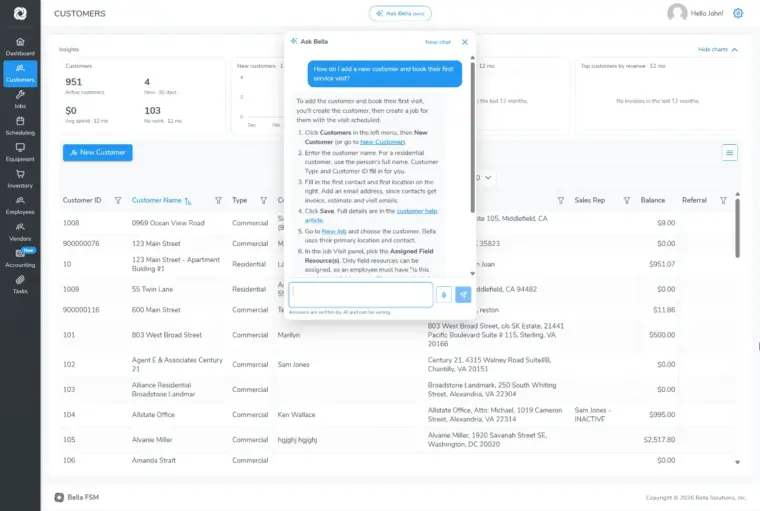
Ask Bella
Answers in seconds
Plain-English QuestionsAsk the way you talk
Step-by-Step AnswersReal button names
Direct LinksJump to the right page
Any TimeNo support ticket needed
Help where you work
What the Ask Bella AI assistant does for you.
New office staff, a busy owner, a tech who only uses Bella once a week: everyone hits a "how do I do this?" moment. Ask Bella answers it on the spot, inside the software, so the work keeps moving.
How-To Answers in Steps
Ask how to do anything and get numbered steps that use the same button and field names you see on screen, not generic advice.
One-Click Links to the Right Page
Answers link straight to the page you need, like New Job, Calendar or Invoice List, so you go from question to doing it in one click.
Opens Records Ready to Go
Give it an invoice or job number and Ask Bella can open that record ready for the next step, such as an invoice with email options set to send.
Asks When It Needs More
Ask it to start an estimate and it asks which customer or job it is for, instead of guessing and putting work on the wrong account.
Backed by the Help Center
Answers end with links to the matching help articles, so the full walkthrough is one click away when you want more detail.
Type or Talk
Type your question, or tap the microphone and just say it. On a phone in the field, that means no typing at all.
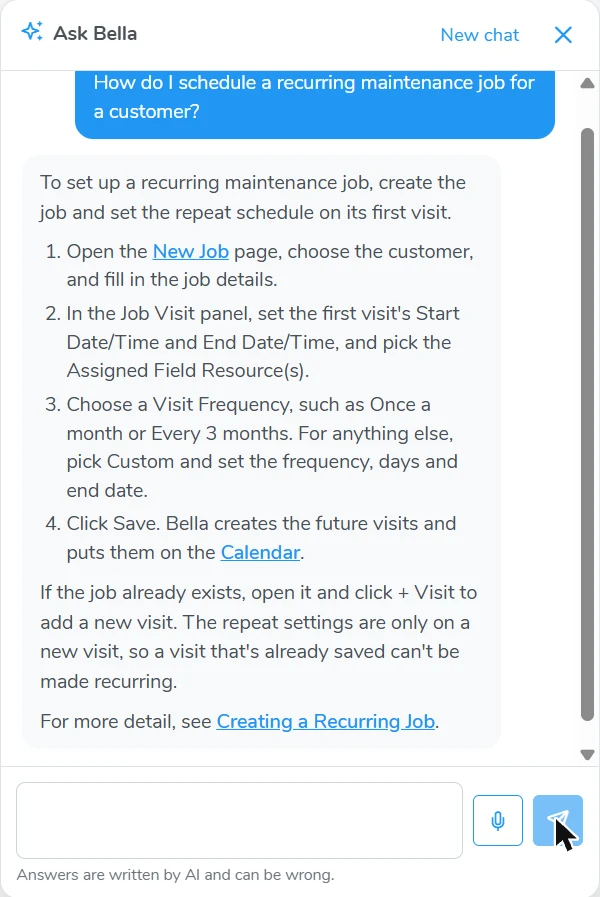
Real answer from Ask Bella
Example: Recurring Jobs
Ask a question, get the exact steps
Asked "How do I schedule a recurring maintenance job for a customer?", Ask Bella lays out four steps: open the New Job page, set the first visit's time and technician, choose a Visit Frequency such as every 3 months, and save. Bella FSM then puts every future visit on the Calendar.
- Steps use the same names you see on screen, like Job Visit panel and Visit Frequency
- Links take you straight to the New Job page and the Calendar
- Catches the details people miss, like adding a visit to a job that already exists
- Ends with the matching help article for the full walkthrough
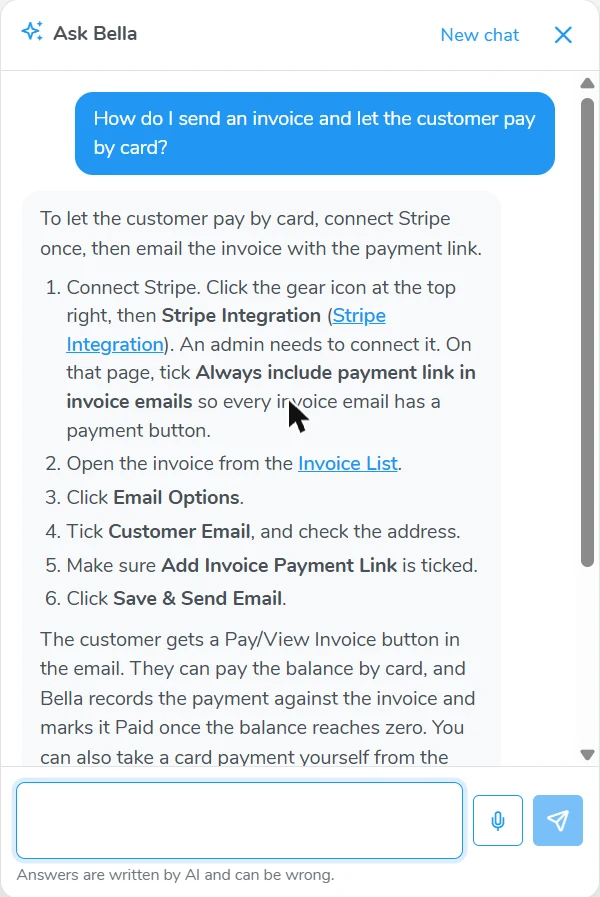
Real answer from Ask Bella
Example: Getting Paid
From "how do I get paid by card?" to a sent invoice
Ask how to send an invoice your customer can pay by card, and Ask Bella covers the whole path: connect Stripe once, open the invoice, tick Add Invoice Payment Link, and click Save & Send Email. Your customer gets a Pay/View Invoice button, and Bella FSM marks the invoice Paid when the balance reaches zero.
- Covers one-time setup and the everyday steps in one answer
- Links to Stripe Integration and the Invoice List
- Offers to open a specific invoice, with email options ready to send
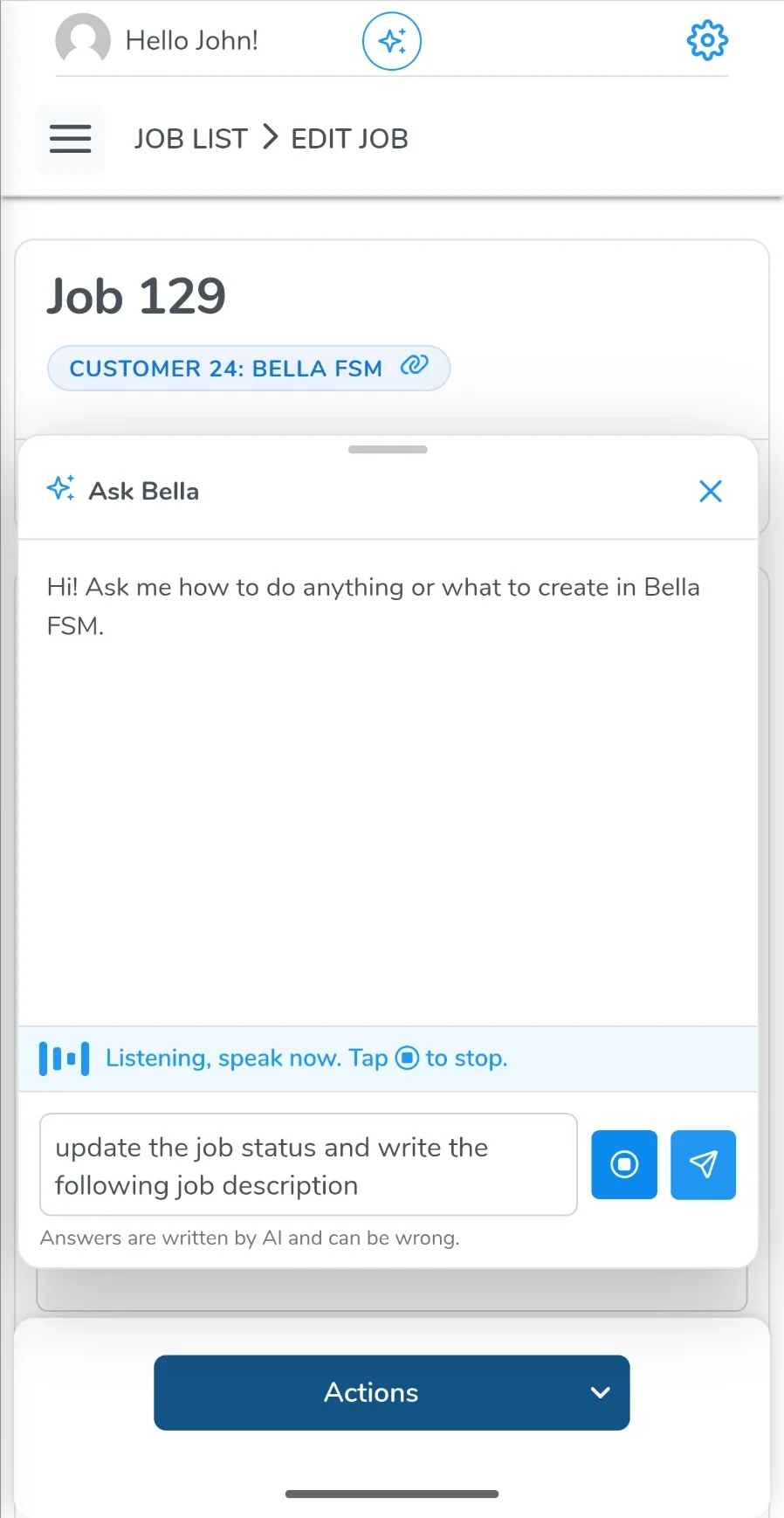
Listening, speak now
For Technicians in the Field
Techs just talk to their phone
Typing job notes on a phone with greasy hands, on a ladder or in a crawl space is slow, so most techs skip it. With Ask Bella they don't have to type. Open the job, tap the microphone and say what needs doing: "Update the job status and write the following job description." Ask Bella takes it from there.
- Speak commands instead of typing on a small screen
- Update a job's status and dictate the job description hands-free
- Works right on the job a tech already has open
- Better job notes for the office, with less effort from the field
Nothing to set up
How to use Ask Bella
Ask Bella is already in your Bella FSM account. There is nothing to install or turn on.
1
Click Ask Bella
The Ask Bella button sits at the top of every screen in Bella FSM.
2
Ask Your Question
Type it the way you would ask a coworker, like "How do I send an invoice?", or tap the microphone and say it.
3
Follow the Steps
Click the links in the answer to jump to the right page, or open the help article for more detail. Click New chat to start a fresh question.
Things to ask Ask Bella
How do I set up a recurring job?
Where is the calendar?
Start a new estimate
How do I email an invoice?
Where do I connect Stripe?
Update the job status
How do I take a card payment?
Where do I find unpaid invoices?
Open invoice 1042
How do I add a visit to a job?
Where do I add a new employee?
Write the job description
How do I turn an estimate into a job?
Where is a customer's job history?
How do I assign a job to a technician?
Answers are written by AI and can be wrong, so each one links to the real screens and help articles for you to check.
Frequently Asked
Common questions about Ask Bella.
What is Ask Bella?
Ask Bella is the AI assistant built into Bella FSM. Click Ask Bella at the top of any screen and ask how to do something in plain English. It answers with numbered steps that use the real button and field names, and links straight to the page you need.
What can I ask Ask Bella?
Anything about using Bella FSM: setting up recurring jobs, sending invoices, taking card payments, scheduling visits, connecting Stripe, and more. You can also ask it to start a task, such as a new estimate, and it will ask which customer or job it is for.
Can Ask Bella open records for me?
Yes. Give it an invoice or job number and it can open that record ready for the next step, such as an invoice with the email options ready to send. You review it and click Save or Send yourself.
Can technicians use Ask Bella on their phone?
Yes. Ask Bella works on a phone too. A technician on a job can tap the microphone and speak a command, like updating the job status or dictating the job description, instead of typing on a small screen.
Does Ask Bella link to help articles?
Yes. Most answers end with links to the matching Bella FSM help articles, so you can read the full walkthrough when you want more detail.
Are Ask Bella's answers always right?
Ask Bella is in beta, and answers are written by AI, so they can be wrong. Each answer points to the real screens and help articles so you can check it, and our support team is there if something does not look right.
Is Ask Bella included in my plan?
Yes. Ask Bella is included in every Bella FSM account at no extra cost.
Stop hunting through menus
Try Bella FSM with Ask Bella built in.
Free 14-day trial. No credit card required. Cancel anytime. Ask Bella is there from your first login to help you set things up.
What Ask Bella gives you
- An AI assistant on every screen
- Step-by-step answers with real button names
- Links straight to the page you need
- Help articles for the full walkthrough
- Opens records ready for the next step
- Voice commands from a technician's phone